
Works with QuickBooks Online
PayAppHub for QuickBooks Online
PayAppHub makes AIA-style pay applications (G702/G703) for subcontractors. Connect QuickBooks Online and each finished pay app goes into QuickBooks as an invoice for the amount due, with retainage on its own line and the pay app PDF attached. When the payment is received in QuickBooks, the pay app is marked paid in PayAppHub. Nobody types the same numbers twice.
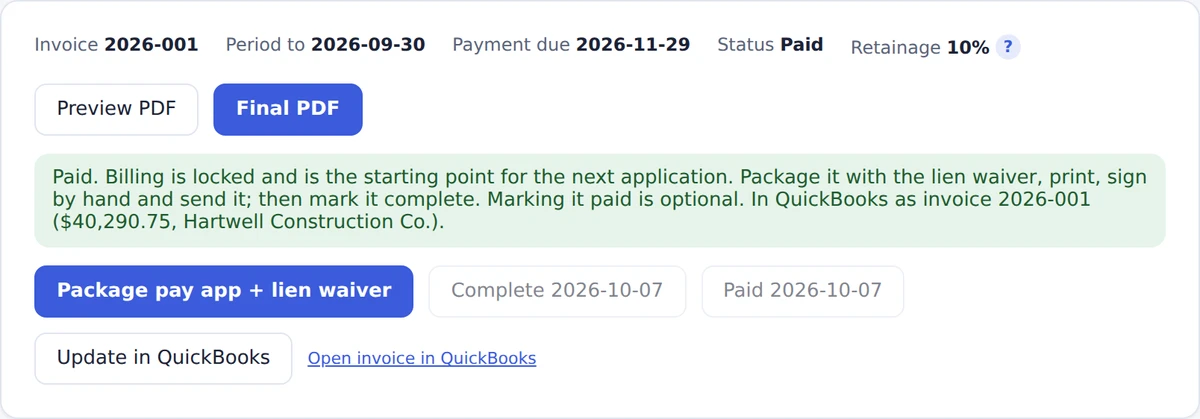
A finalized pay app in PayAppHub, after it was sent to QuickBooks Online.
What PayAppHub does
Builds the pay application
Upload the subcontract and the job, schedule of values and retainage are filled in for you to check. Each month you enter percent complete; everything else carries forward.
Handles the details
Change orders, stored materials, retainage and its release, and your lien waiver, all in one package for the general contractor.
Sends it to QuickBooks Online
One click turns a finalized pay app into a QuickBooks invoice, so your books match what you billed.
Marks it paid
When the invoice is paid in full in QuickBooks, the pay app shows Paid in PayAppHub with the payment date.
How it works with QuickBooks Online
- Connect once. In PayAppHub, go to Company settings, QuickBooks Online, and click Connect to QuickBooks. Sign in to QuickBooks and choose your company.
- Pick your accounts. Choose the income account for billed work and an account for retainage withheld. PayAppHub can create a Retainage Receivable asset account for you.
- Finalize a pay app, then click Send to QuickBooks. The first time on each job, choose the QuickBooks customer (the general contractor, or a job set up under them). Finalizing alone never sends anything.
- Or send automatically. Turn on sending when you mark a pay app complete, and later pay apps on that job go over by themselves.
- Receive the payment in QuickBooks. Open the pay app in PayAppHub and it's marked paid.
What goes into QuickBooks
- An invoice for the pay app's current payment due, under the customer you chose
- A line for the work completed and materials stored this period
- A line subtracting the retainage withheld this period (a retainage application becomes an invoice for the retainage)
- Your invoice number, the period date and the due date
- The pay app PDF, or your full billing package, attached
If you unlock and change a pay app after sending it, click Update in QuickBooks and the same invoice is changed. PayAppHub reads your QuickBooks accounts, customers and invoice payments. It only adds what billing needs: the invoices you send, the customers or jobs you choose to create, two items (Progress Billing and Retainage) and, if you choose it, a Retainage Receivable account.
Works with QuickBooks Online (United States). QuickBooks Desktop isn't supported.
Pricing
| Plan | Price (US dollars) | Includes |
|---|---|---|
| Solo | $39.99 a month | 1 user who can bill, 15 pay apps a month |
| Standard | $79.99 a month | 5 users, 50 pay apps a month |
| Premium | $129.99 a month | 15 users, unlimited pay apps |
The QuickBooks Online connection is included in every plan. Pay yearly and get two months free. Every plan starts with a 30-day free trial.
Help and support
Step-by-step guide: Send pay apps to QuickBooks Online. Questions? Email support@payapphub.com, or use the help assistant inside the app.