PayAppHub

AIA-style pay applications for subcontractors

Pay apps done in minutes, not afternoons.

Fill in this month's billing, print it, sign it, send it. Next month picks up right where you left off: no retyping, no spreadsheet math, no missing numbers.

Get organized. Get paid.

No charge for 30 days · Cancel any time in two clicks · Plans from $39.99/month

app.payapphub.com
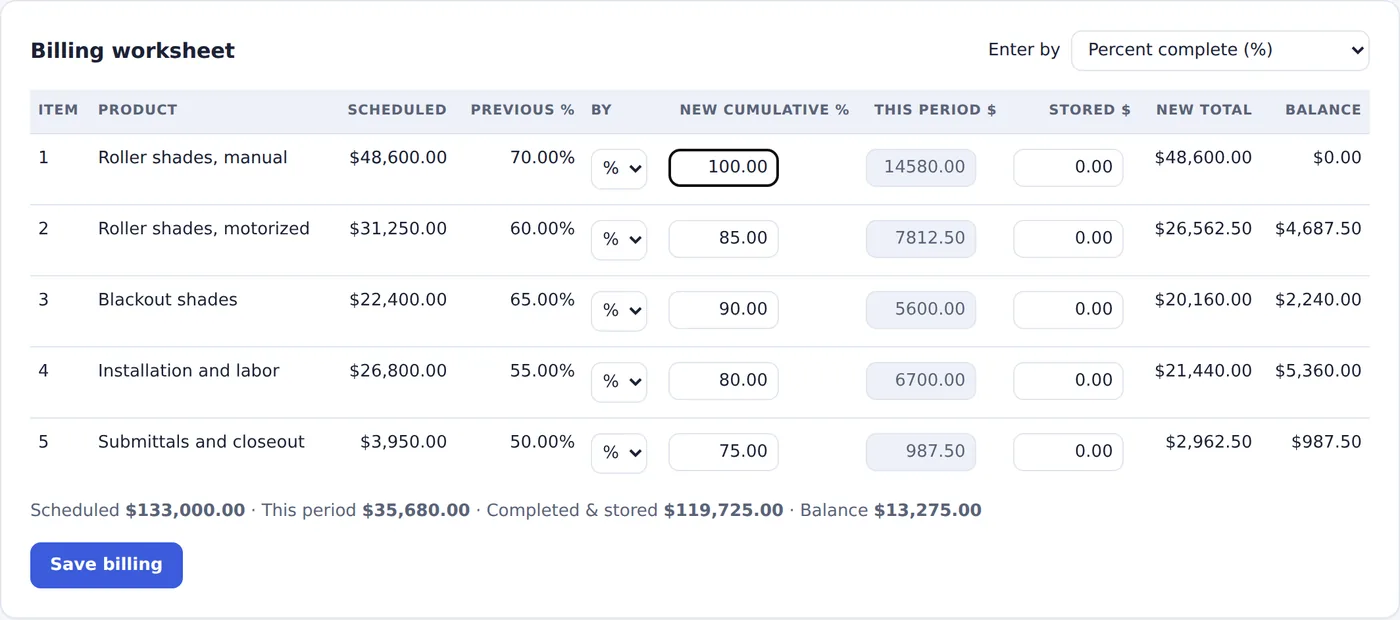
The PayAppHub billing worksheet: each schedule-of-values line with previous percent, new percent complete, this period's amount and balance.
Current payment due$32,112.00Pay application #3 · calculated for you

Three steps. Every month.

If you can fill out a G702 by hand, you already know how to use PayAppHub. It just does the math and the retyping for you.

  1. 1

    Set up the job once

    Drop in the contract, or type in the contract amount, retainage and your schedule of values. Takes a few minutes, one time.

  2. 2

    Bill the month

    Enter percent complete or dollars for each line. Totals, retainage and the amount due fill in as you type.

  3. 3

    Print and send

    Sign & finalize, then download one PDF with the pay application, lien waiver and photos, plus an email ready to send to the GC.

The big one

Next month starts right where you left off.

Every pay application remembers the last one. Previous work, stored materials and retainage carry forward on their own, and invoice numbers keep counting.

  • Pay apps numbered in order: no skips, no duplicates
  • Previous applications and retainage carried forward to the penny
  • Change orders added to the contract and the schedule of values
  • Final retainage billed with one click when the job wraps up
  • See what's been billed, paid and is still owed on every job
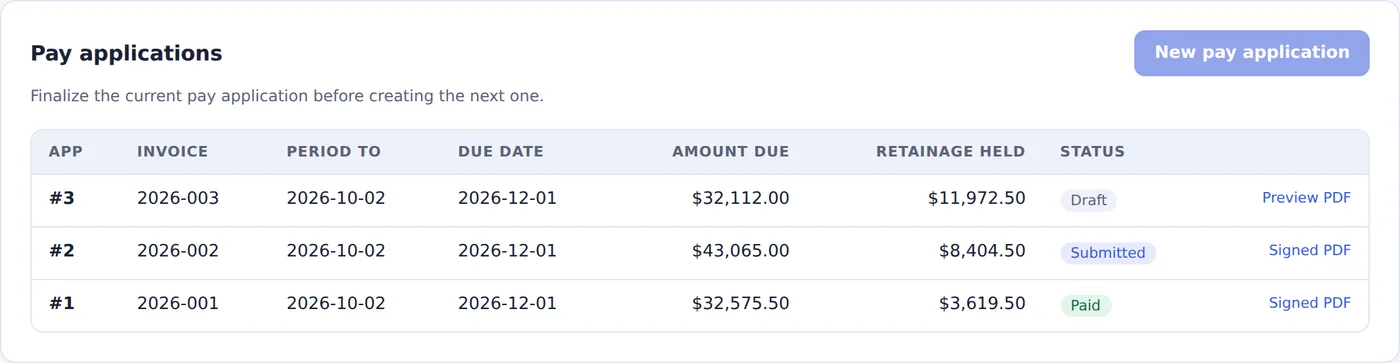
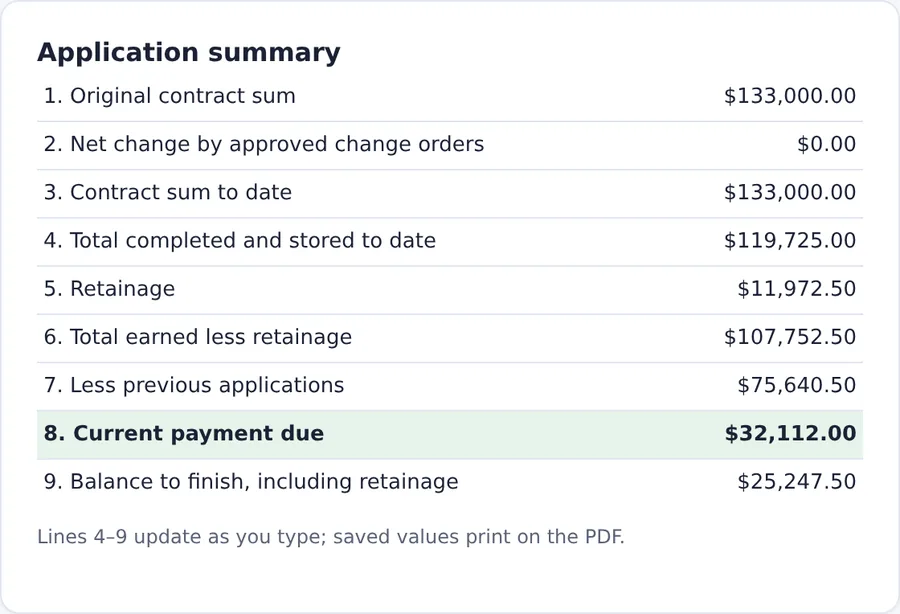
A project's pay applications in order: #1 paid, #2 submitted, #3 draft, with amount due and retainage held for each. Application summary lines 1 through 9, from original contract sum to current payment due.

Print and send

One clean PDF the GC can process.

The application and continuation sheet in the familiar AIA layout, with your lien waiver and your photos, combined into a single file in the right order.

  • Everything filled in; just sign by hand
  • Notarization? Print it and take it to the notary like always
  • Stored-material photos and supporting documents attached
  • A ready-to-send email to the GC's billing contact
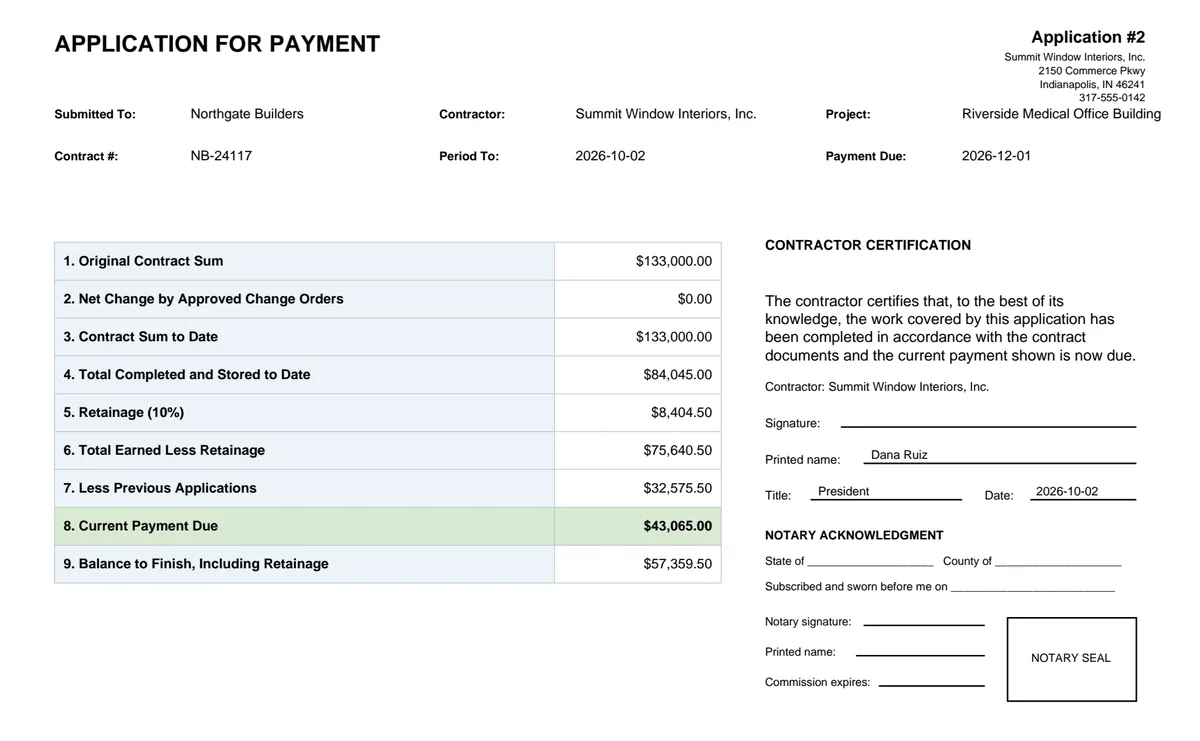
A finished application for payment PDF with lines 1 through 9, the printed name and date filled in, and the signature and notary lines left blank to sign by hand.

Starting a new job

It reads your contract, so you don't have to.

Upload the subcontract the way you got it, even a scanned copy, or just forward the GC's email to your company's PayAppHub address. PayAppHub reads it the way your office manager would and fills in the job for you:

  • The contract amount and retainage percent
  • Project name, address, owner, and contract and job numbers
  • Who at the GC gets your billing, and their email
  • Your schedule of values, from the contract or your estimate
  • Lien waivers and forms that came in the same packet

Reading a typical subcontract costs about 20 cents, and every plan includes enough for dozens of contracts a month.

You stay in charge. Next to every answer it shows the page it came from. You look it over, fix anything you like, and click Create. Nothing is saved until you do.

PDF
Subcontract - Riverside MOB.pdf42 pages · read in about a minute
  • Contract amount$133,000.00page 3
  • Retainage10%page 7
  • ProjectRiverside Medical Office Bldgpage 1
  • Contract #NB-24117page 1
  • Billing contactap@northgate.examplepage 9
  • Schedule of values5 lines · $133,000.00Exhibit B
Looks right? Create project

Lien waivers

Fill the waiver right on screen.

Your GC's waiver shows up just like the paper copy. Let PayAppHub fill it in, or tab through the highlighted blanks and type it yourself. Your call.

  • Blanks highlighted in yellow, so nothing gets missed
  • Works with fillable PDFs, scanned forms and your own company waiver
  • Type anywhere on the page if a form has no blanks at all
  • Notary sections left clear for the notary
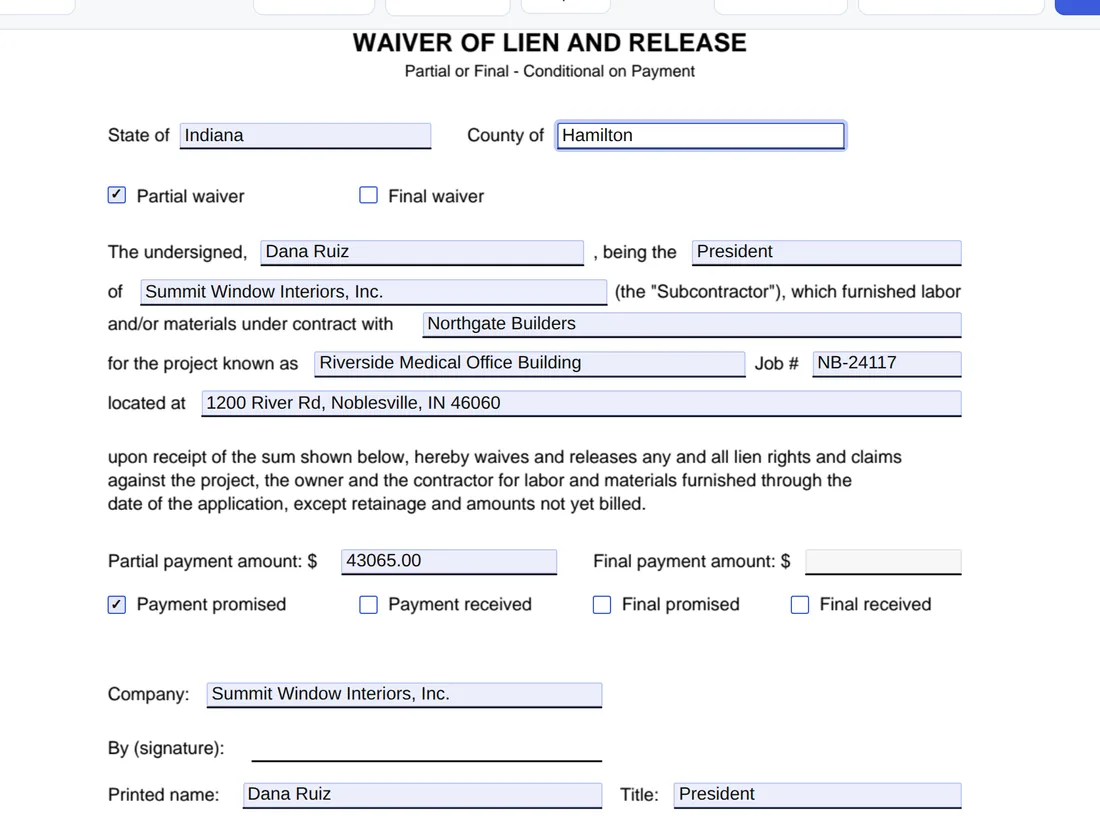
A lien waiver on screen: blanks filled in blue, one typed by the user, and the signature line left blank.

Works with QuickBooks Online

One click, and the pay app is a QuickBooks invoice.

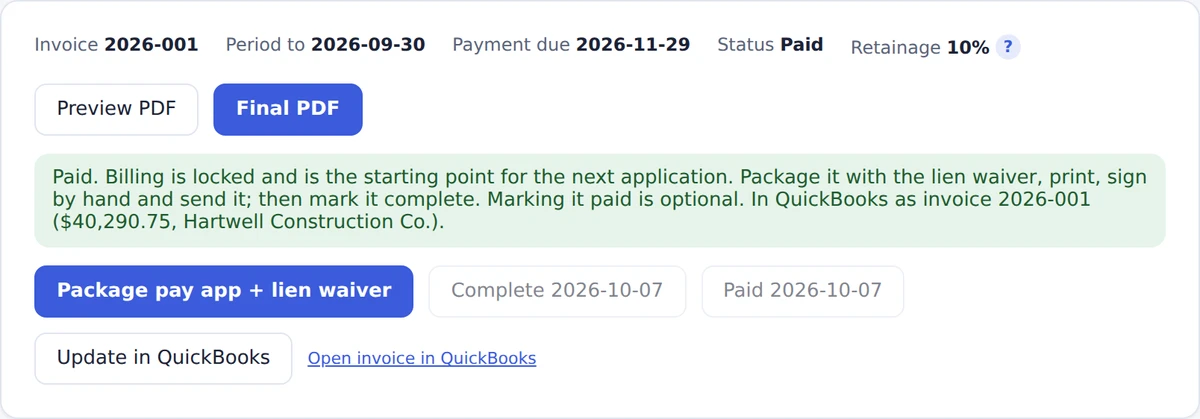
Connect QuickBooks Online once. After that, one click turns a finalized pay app into a QuickBooks invoice, so nobody types it twice.

  • The invoice total matches the amount due, with retainage withheld on its own line
  • Your invoice number, dates and the pay app PDF go with it
  • Billed to the GC, or to the job set up under them
  • Paid in QuickBooks? The pay app is marked paid here too
  • Send automatically when you mark a pay app complete, if you like

Included in every plan. Sign in to QuickBooks once; there's nothing to install. How it works with QuickBooks Online →

A finalized pay application in PayAppHub showing it's in QuickBooks as invoice 2026-001 for $40,290.75, with Update in QuickBooks and Open invoice in QuickBooks buttons.
QuickBooks invoice2026-001
  • Progress BillingPay App #1, work this period$44,767.50
  • RetainageWithheld (10%)−$4,476.75
Total$40,290.75
Pay app PDF attachedPaid

Everything else a sub needs to bill.

Forward it by email

Forward an approved change order, a sub's lien waiver or a new contract. It's read, matched to the job, and added when you confirm.

Retainage release

Bill your held retainage with the final waiver, in one click.

Stored material photos

Attach photos when you bill stored material. It reminds you if you forget.

COI requests

Track which jobs need a certificate and email your agent the request.

Your whole team

Billers, admins and free view-only users for the owner or PMs.

Change history

See who changed what and when, on every job and pay app.

Ready to start getting paid?

Unlimited projects on every plan, a 30-day free trial, and no setup fee.

Solo $39.99/moStandard $79.99/moPremium $129.99/mo

Built for subcontractors in every trade.

If you bill a general contractor on a schedule of values, PayAppHub fits the way you work.

…and many other specialty trades. See how PayAppHub works for your trade →

See it in a few minutes.

Short narrated tutorials, one feature at a time, on the demo company.

More on YouTube →

All PayAppHub videos

New tutorials added as we go

Why PayAppHub

Built by subcontractors, for subcontractors.

PayAppHub started inside a commercial window-treatment subcontractor that was tired of retyping the same pay application every month, chasing retainage across spreadsheets, and filling out lien waivers by hand. We built the tool we wanted: simple enough to learn in an afternoon, careful enough to trust with the numbers, and priced for a small office, not a general contractor's budget.

Simple pricing. No project limits.

30 days free on every plan. View-only users are always free. Going over your pay-app allowance never blocks your billing.

How PayAppHub compares

  • Prices on the page. Several competitors only quote after a demo.
  • 30 days free. Others offer 14 days, or a demo only.
  • Unlimited projects. Some pay app plans cap you at 15 or 30 projects.
  • AI contract reading included. Upload the subcontract and the job fills itself in.
See the full comparison →

Questions

Do I need a credit card to try it?

Yes, a card starts your 30-day free trial, but you aren't charged until the trial ends, and you can cancel any time before then in two clicks from Plan & billing.

Does my general contractor need an account?

No. You send the GC a normal PDF and email, the same way you do today. Only the people who bill need to sign in.

Can I bill stored materials and send photos, invoices or other documents with the pay app?

Yes. Each schedule-of-values line has a Stored materials column. Stored amounts count toward completed and stored to date, retainage applies to them like any other billing, and they carry forward to the next pay application automatically.

You can attach as many photos and documents to a pay application as you need: stored-material photos, supplier invoices, delivery tickets, your COI, affidavits or anything else the GC asks for (PDF, JPG or PNG). Photos become captioned pages, and if you bill stored materials without attaching photos, PayAppHub reminds you before the package is built. You check which items to include, and everything comes out as one PDF in order: the signed pay application, the lien waiver, then your attachments. Forms that need filling out can be completed on screen or with AI.

Does it work with QuickBooks?

Yes, with QuickBooks Online. Connect it once in Company settings, then click Send to QuickBooks on a finalized pay app (or have it sent when you mark the pay app complete). PayAppHub creates the invoice for the amount due, with the work billed this period and the retainage withheld on separate lines, your invoice number and the pay app PDF attached. When the invoice is paid in QuickBooks, the pay app is marked paid in PayAppHub. It's included in every plan. QuickBooks Desktop isn't supported yet.

Is this an official AIA product?

No. PayAppHub produces AIA-style payment applications and continuation sheets in the familiar layout GCs expect. It isn't affiliated with or endorsed by the American Institute of Architects.

Do I have to use the AI?

No. Everything can be typed in by hand. The contract reader and form filling are there to save time, and nothing they find is saved until you review it.

What does the "AI contract reading" allowance mean?

Reading a contract with AI has a small cost. In our testing on real subcontracts, from 1 to 114 pages and including scanned copies, it averaged about 20 cents per contract. A large scanned packet can run 50 cents or more. Filling in a lien waiver or form with AI costs a few cents.

Each plan includes a monthly allowance that covers far more than most subs need: about 40 contracts a month on Solo, 100 on Standard and 240 on Premium. Your Plan & billing page shows how much you've used as a simple percent. It resets on the 1st of every month, and you never pay extra. If you ever use it all, everything else keeps working and you can type the job in by hand.

Is my data safe?

Each company's data is walled off from every other company's, files are stored encrypted, and every change is recorded in your change history. Your pay applications are yours to download any time.

What happens if I cancel?

Your plan runs to the end of the period you paid for. After that your account becomes read-only, so you can still view and download every pay application.

Get organized. Get paid.

Start your 30-day free trial and send this month's pay app from PayAppHub.

Start your free trial