
AIA-style G702 & G703
Fill out your G702 and G703 online, with the math done for you
Enter percent complete on each line. PayAppHub fills in the G702 application and the G703 continuation sheet: retainage, previous applications, current payment due and balance to finish. Then print it, sign it and send it.
Three steps, every month
What goes on the G702
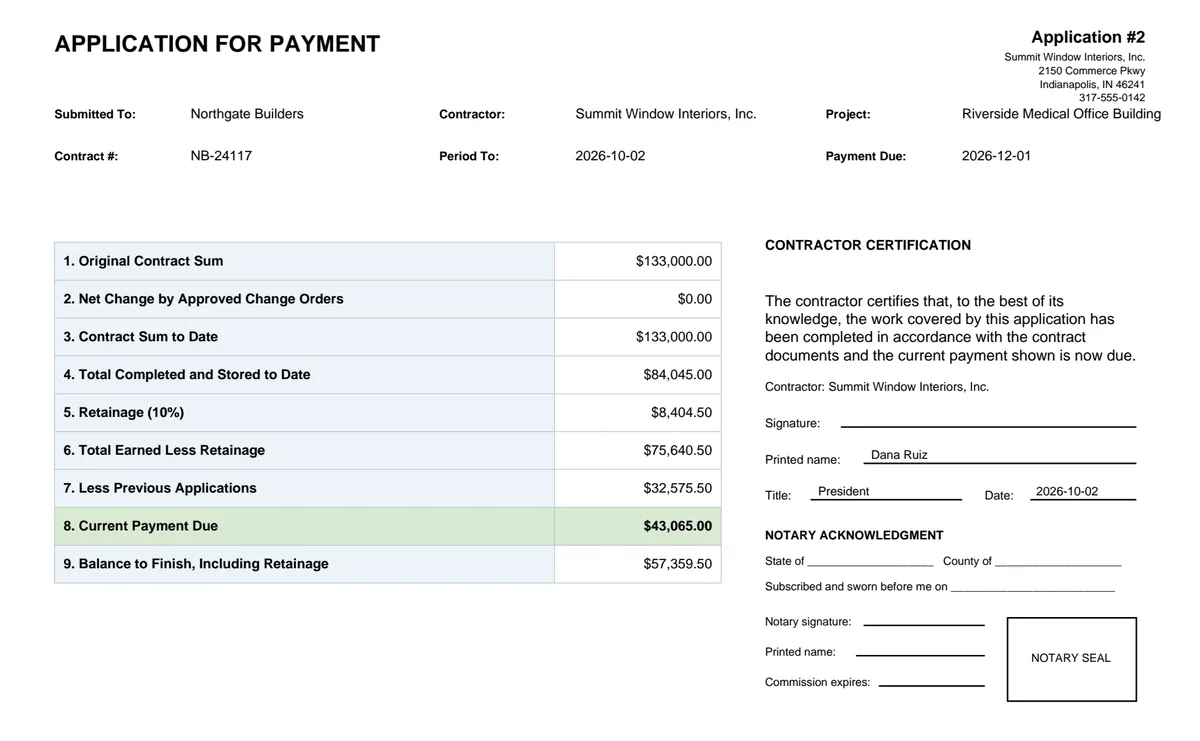
The G702 is the cover page: the totals for the whole contract. These are the nine lines PayAppHub fills in.
| 1. Original contract sum | Your subcontract amount. |
| 2. Net change by change orders | The total of approved change orders, added for you when you save them. |
| 3. Contract sum to date | Line 1 plus line 2. |
| 4. Total completed and stored | From the G703: work done to date plus materials stored. |
| 5. Retainage | The percentage held back, figured line by line. |
| 6. Total earned less retainage | Line 4 minus line 5. |
| 7. Less previous applications | Carried from last month's pay app, so you never look it up. |
| 8. Current payment due | What this pay app asks the GC to pay. |
| 9. Balance to finish | What's left on the contract, including retainage. |
And the G703 continuation sheet
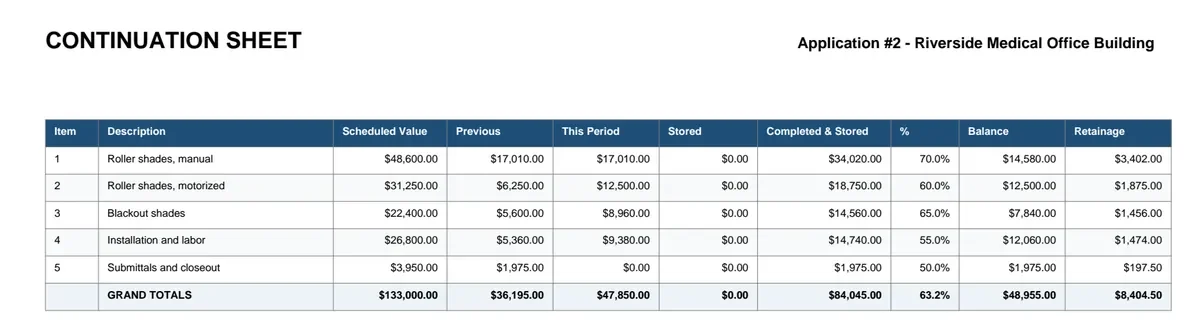
The G703 lists every line of your schedule of values: scheduled value, previous, this period, stored, total completed, percent, balance and retainage. Change orders appear as their own lines. Totals tie to the G702 automatically, so the two pages always agree.
Compared with buying the forms or using Excel
| Blank forms | Excel template | PayAppHub | |
|---|---|---|---|
| Math on lines 1 to 9 | By hand | Formulas you keep fixing | Done for you |
| Last month carried forward | Retyped | Copy and paste | Automatic |
| Change orders on the SOV | By hand | New rows by hand | Added when you save one |
| GC's lien waiver filled in | No | No | Yes, on their own form |
| Cost | Per form from AIA | Free, plus your time | 30 days free, then from $39.99/mo |
Do this month's pay app the easy way
30 days free. Pay applications for subcontractors. Made by subcontractors.
Questions
Is this the official AIA G702 and G703?
No. PayAppHub makes AIA-style pay applications: the same two pages, the same nine lines and the same continuation-sheet columns, with the math done for you. Most general contractors accept them. If your contract says you must use official AIA Contract Documents, ask your GC first; AIA sells those forms separately.
What does it cost?
Every plan starts with a 30-day free trial. After that, Solo is $39.99 a month for one person billing up to 15 pay apps a month, and there are no limits on projects.
Do I have to re-enter everything next month?
No. Pay app #2 starts from #1: previous applications, retainage, stored materials and approved change orders carry forward. You only enter this month's progress.
Can it do retainage and stored materials?
Yes. Retainage is figured on each line (and released at the end with a final application), and stored materials go in their own column with photos for backup.
Can I sign and notarize it?
You print the finished PDF, sign it, and have it notarized if your GC requires it. The lien waiver and any backup go in the same package.
Does it work with my GC's billing portal (Textura, Procore)?
Portals like Textura and Procore have their own billing screens that you fill in inside the portal. PayAppHub is for GCs who take pay applications by email or on paper.
More detail: How to fill out a G702/G703 pay application · Watch the tutorials · Ask us a question